Multi-PC collab
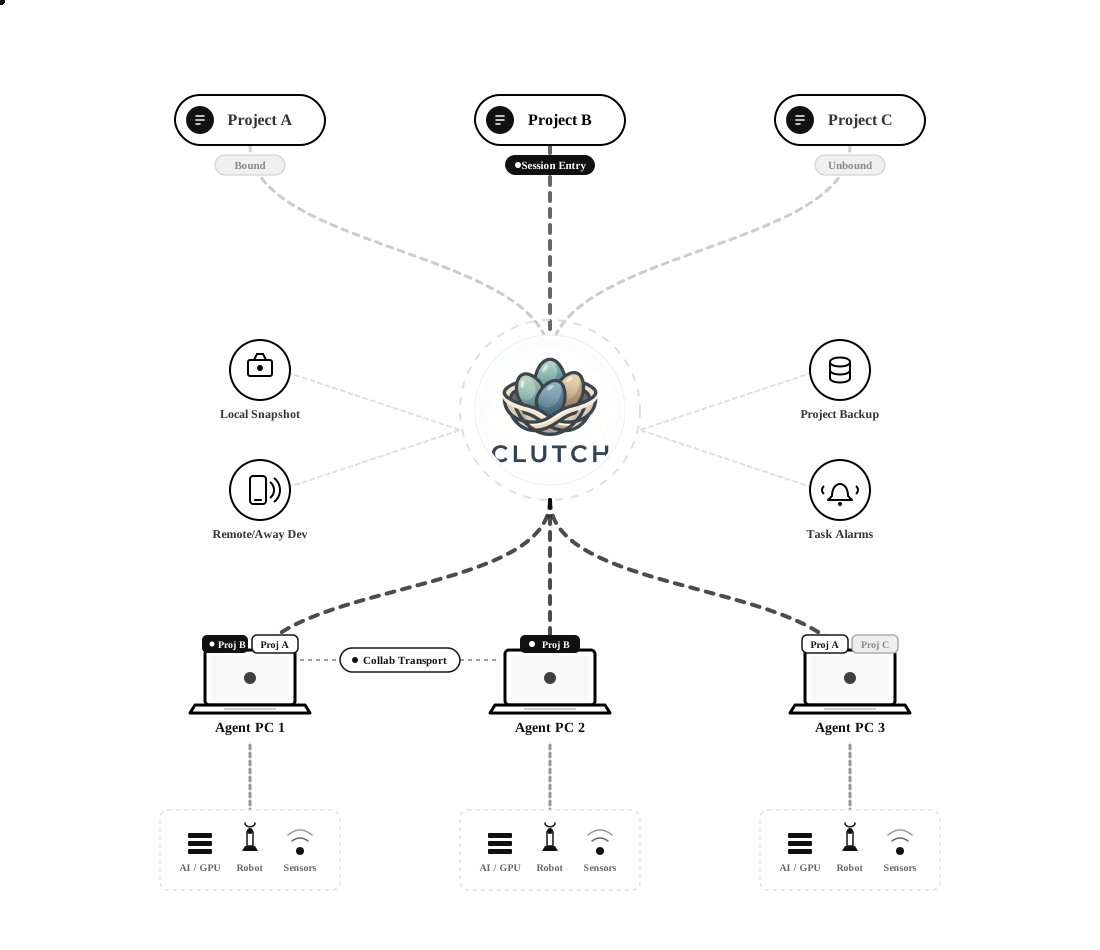
Main and worker sessions can coordinate through project roles, file transport, task records, and peer freshness checks.
Multi-PC Codex orchestration
Coordinate Codex sessions, worker PCs, shared artifacts, visible collab monitoring, reproducible snapshots, and bounded away development plans for AI and robotics labs.
Why it exists
CLUTCH is designed for AI and robotics teams where code, datasets, model weights, robot logs, and compute roles live across multiple machines. It gives Codex a durable re-entry layer, then keeps project state, collab context, backups, and recovery evidence visible to the operator.
Architecture
CLUTCH routes the active project through session entry, visible collab transport, local snapshots, project backups, task alarms, and machine-local resources without forcing private hardware, datasets, or credentials into the public package.
Core advantages
Main and worker sessions can coordinate through project roles, file transport, task records, and peer freshness checks.
The collab monitor shows role source, active request context, recent results, and stale peer signals without hiding work in chat history.
Code, docs, snapshots, metadata, local backups, and artifact pointers are tracked separately from heavy model and dataset files.
Long-running Codex work gets an explicit objective, allowed scope, stop conditions, checkpoints, and verification trail.
Project warnings, readiness checks, command previews, backup evidence, Help, and collab status are available from a local browser.
First-run setup asks for local folders, machine identity, GitHub preference, and collab choices instead of embedding lab-specific data.
Operating model
Every Codex session starts with session-entry, finds the project, and restores the right local context.
Attach one machine as main and optional peers as worker or observer.
Use collab transport, shared docs, task records, snapshots, and artifact pointers so handoffs are inspectable.
Before risky changes, CLUTCH can create backups and metadata that explain what can be restored and what stays local.
Guided first run
Choose your CLUTCH home, project root, artifact store, machine id, GitHub preference, and whether this PC should auto-attach.
Point CLUTCH at an existing git workspace or a new project folder while CLUTCH keeps its own metadata under your local CLUTCH home.
Use a shared folder over wired LAN or another trusted local path, then attach machines as main and worker without embedding peer addresses in the public package.
Use the Web console to inspect warnings, collab monitor state, backup readiness, snapshots, and away-development boundaries.
Example operator prompts
The public Prompt Cookbook expands these examples into first-run, multi-PC collab, backup, away-development, Web UI, and release review prompts.
Attach this session to my robot-policy project as main and show what needs attention before I start.Ask the worker machine to inspect the training logs and report only memory bottlenecks and failed runs.Prepare an away plan for low-risk documentation and test hardening. Stop before publishing or touching hardware.Before this refactor, create a local backup and tell me whether the project is reproducible from git and artifact pointers.Safety boundary
Hardware motion, sudo, credential changes, destructive restore, and public publication still require explicit operator approval.
The public package ships templates and guides, not private machine names, LAN IPs, SSH aliases, account tokens, robot profiles, or lab runtime state.
Large-project backup is explicit: source and docs can live in git, while datasets, model weights, logs, and media are recorded as artifact pointers unless you choose another policy.
User verification
Use a fresh home to install CLUTCH, run the first-run wizard, pass doctor checks, enter through CLUTCH, and create a first project without private lab defaults.
Run the included verification commands to test the landing page, Web console, Help tab, Monitor tab, and packaged collab transport from your own checkout.
CLUTCH keeps source, docs, snapshots, metadata, and artifact pointers visible while large datasets, model weights, logs, and media stay in storage you control.
Install path
CLUTCH does not require sudo. The public first-run wizard records your own CLUTCH home, project root, artifact store, machine id, GitHub setup preference, and optional multi-PC collab plan.
unzip clutch-public-*.zip
cd clutch-public-*
export CLUTCH_HOME="${CLUTCH_HOME:-$HOME/.clutch}"
bash installer/install.sh --prefix "$CLUTCH_HOME"
cd "$CLUTCH_HOME/foundation/current"
python3 installer/clutch_first_run_wizard.py
python3 installer/clutch_doctor.py
python3 scripts/clutch_ctl.py session-entry